Business
Business Refund & Cancellation Policy
Last updated: 6 October 2026
This policy explains how order cancellations, customer refunds, and fees work for shops selling on marchmello, operated by MARCHMELLO LTD. It applies to you as a partner shop and supplements the Business Terms you accepted when you registered. Customers have their own Refund & Cancellation Policy.
1. When a customer cancels an order
Customers can cancel an order depending on how far it has progressed:
| When the customer cancels | Customer refund |
|---|---|
| Before you accept the order (still “pending”) | 100% |
| After you accept it | 50% |
| After the order is served | Cannot be cancelled |
When a customer is refunded, the matching portion of your payout for that order is reversed automatically. You keep your share of any amount that is not refunded — for example, your share of the 50% retained when a customer cancels an order you had already accepted.
On a delivery order, the customer can cancel until you mark it out for delivery. The delivery fee is always refunded to them in full when an order is cancelled, so that part of your payout is reversed too.
2. When you cancel or reject an order
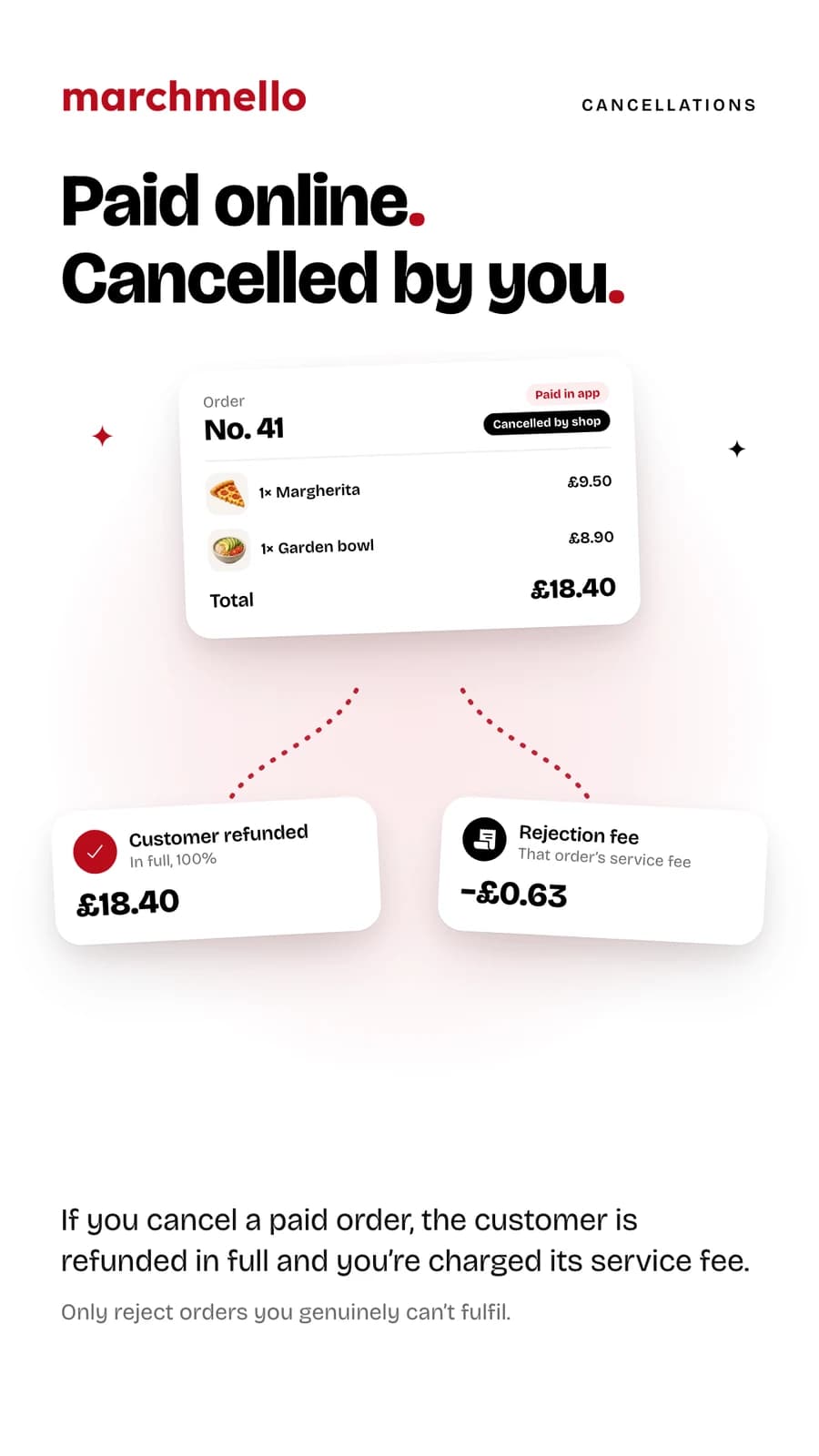
If you cancel or reject a paid order, the customer always receives a 100% refund and your entire share of that order is reclaimed. Because a rejection still incurs payment processing and platform costs, you also owe that order's service fee as a rejection fee. Please only reject orders you genuinely can't fulfil. This includes a delivery you couldn't complete or that arrived damaged — the customer's refund then includes the delivery fee.
3. How reversals reach your payouts
Refunds and reclaimed amounts are taken from your connected Stripe balance. If those funds have already been paid out to your bank, the shortfall becomes an outstanding balance that we recover from the payouts on your next orders. You can review your balance, payouts, and recent activity in the Business area of the app.
4. Commission and fees on refunds
Our commission is charged on the value of completed sales. When an order is refunded to the customer, we do not retain commission on the refunded portion. The one exception is the rejection fee in section 2, which you owe when you cancel a paid order. We never take commission on a delivery fee — it is paid to you in full.
5. Counter orders, till sales and age-restricted items
Orders the customer chooses to pay for at the counter never pass through us. No commission and no service fee are charged on them, there is nothing for us to refund, and any money you have taken is yours to refund or not, as you and the customer agree — section 6 explains how to refund an order once it has been served. It is your responsibility to take payment before handing the order over.
Sales you ring up on the till at marchmello.co.uk/pos work the same way: nothing passes through us, no commission or service fee is charged, and there is nothing for us to refund. Customers can't cancel a till order from the app. If you cancel one, any points or voucher the customer used on it go back to them, and points are only ever credited once you mark it served.
Orders containing items you have flagged as alcohol are always counter orders — the app will not let a customer pay for them online. You must check the customer's age in person and record that check in the app before taking payment or serving the order. If they cannot show they are 18 or over, refuse the order; nothing has been paid through us, so nothing needs refunding.
Delivery orders are paid online unless you accept cash on delivery. A cash order works like a counter order: nothing passes through us, no commission or service fee is charged, your driver collects the money at the door, and you mark it received in the app before marking the order delivered. If the customer isn't in or won't pay, there is nothing for us to recover — that risk is yours. Orders with alcohol can't be delivered either way, and if you are delivery only, customers can't place counter orders to collect.
6. Refunding an order paid at the counter
Once an order the customer paid for at the counter has been served, you can refund all or part of it and record the refund on marchmello. On your till at marchmello.co.uk/pos you can refund these orders on the day they were served, apart from deliveries. In the app, under Orders → Completed, you can refund them for 180 days after they were served, cash on delivery included. Each refund needs a reason.
The money never passes through us: you hand it back yourself, the way the customer paid — in cash, or on your own card machine — and your payouts aren't affected. A refund covers the order itself, not the delivery fee on a cash-on-delivery order; hand that back as well if it's owed.
Recording a refund takes back the points the order earned, in step with the money: refunding £4 of a £10 order takes back 4 of its 10 points. Points can be converted to other shops in the network, so they must only ever stand for money a shop has kept. Refunding everything left on the order undoes the sale: the customer gets back any points, voucher, reward card or stamp-card free item they used on it (a voucher or reward card only if it is still valid), and the stamps the order earned come off their card, along with any free item those stamps completed that they haven't claimed. A sale without a customer's MELLO code has no points to take back. We notify the customer of every refund.
A refund can only take back points the customer still has. If they have already spent the points the order earned, converted them to another shop or sent them to a friend, the refund can't be recorded, or can be recorded only for the part their remaining points cover — the till and the app show you the most you can refund. A refund of everything left can still go through when the points the customer spent on the order, which come back to them, make up the difference. An order may also not be refundable in full once the stamps it earned have gone towards a free item the customer has claimed, or while money from it has gone towards a Spending Reward the customer has since used on another order — the till and the app say which one — though part of it can.
Only record a refund for money you actually give back to the customer. Anyone with your POS code can refund at the till, so — as with anything else done under your codes — you are responsible for refunds made there, and we send you a notification for each one. We keep a record of every refund: the amount, the reason and any note, and when and where it was made.
7. Chargebacks and disputes
If a customer disputes a payment with their bank or card provider, the dispute is handled through Stripe. You are responsible for providing evidence for orders on your shop and for the outcome of any dispute, including associated fees.
8. Goodwill refunds you offer directly
Served orders can't be cancelled in the app. If you want to offer a goodwill refund, replacement, or remake for a served order, arrange it with the customer directly, or contact us at contact@marchmello.co.uk and we can help. If the customer paid at the counter, you can record the refund as section 6 describes.
9. Leaving marchmello
You can remove your shop at any time. Any outstanding balance owed to the platform must be settled, and pending payouts are released once refunds and disputes on your orders have cleared.
10. Contact
Questions about payouts, refunds, or fees? Email contact@marchmello.co.uk.